Quantum-Resistant Hardware Wallets vs SYNX USB Backups
A USB backup and a hardware wallet protect different parts of the custody process. A normal USB drive stores exported files. A dedicated hardware signer is designed to keep signing keys within the device and confirm transactions through its own interface. Neither label alone changes the cryptography accepted by an asset's network.
For an overall shortlist, start with the quantum-resistant wallet comparison. This guide focuses on storage, signing and recovery so you can choose the protection you actually need.
What does a quantum-ready hardware wallet protect?
Read a manufacturer's claim at the component level. For example, Trezor's quantum-ready explanation concerns the device's security and upgrade foundations. A supported coin still has its own transaction-signature and network-migration requirements.
Ask where the private key lives, what the display confirms, how firmware updates are authenticated and how recovery works. A protected device cannot override the blockchain's signature rules. Equally, a post-quantum signature scheme does not prevent compromised desktop software from misusing an unlocked key.
What does a SYNX encrypted USB backup do?
The SYNX wallet includes USB export and import controls. The existing product screenshot below shows an export dialog with drive selection, wallet selection and a passphrase. It is a reference image of that workflow; labels and layout can vary by release.
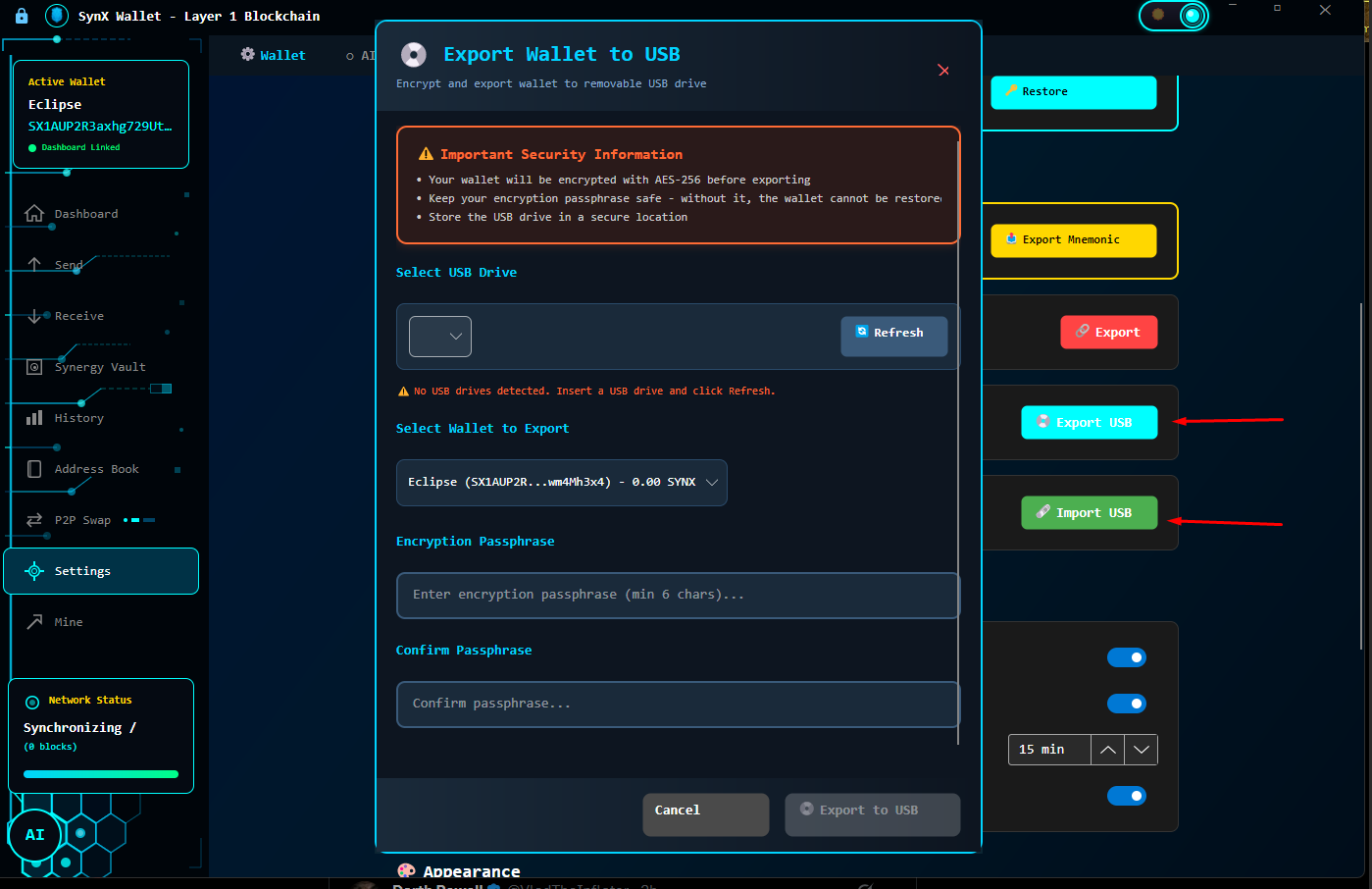
Once disconnected, the USB drive is offline storage. That does not prove the original signing key was generated offline, erased from the computer or never exposed. The encryption passphrase and the computer used during export and import remain part of the security model.
| 工具 | Primary purpose | Check before relying on it |
|---|---|---|
| Encrypted USB export | Recover wallet data from a stored copy | Export coverage, passphrase, readable media and a successful documented restore |
| Dedicated hardware signer | Isolate keys and confirm signing operations | Supported assets, firmware authenticity, recovery model and transaction display |
| Post-quantum network signatures | Resist the relevant quantum signature attacks | Exact scheme and active network verification rules |
How should you check a SYNX USB backup?
- Identify the release. Match your platform to the download listing and follow its corresponding documentation.
- Identify the exported wallet. Record which account or wallet the export covers. Do not assume one export covers every account.
- Protect the passphrase. Keep it recoverable and separate from the media. The UI's minimum length is not a recommendation for a strong passphrase.
- Check the copy. Follow the backup instructions and test restoration without exposing recovery material to a website or support chat.
- Maintain recoverability. Protect against drive loss, media failure and forgotten credentials. Recheck your documented procedure after meaningful wallet changes.
Does stateless signing remove backup risk?
No. SynergyX specifies SPHINCS+-SHAKE-128s, a stateless signature design. It avoids the consumed-signing-index issue associated with stateful schemes, but it does not make backups indestructible or repair an exposed recovery phrase. Read the XMSS versus SPHINCS+ recovery guide for that distinction.
Set up a recovery process you can use
Review SYNX wallet features, inspect the release and recovery review, then follow the setup guide.
Frequently asked questions
- Does an ordinary USB drive become a hardware wallet?
- No. It can store an encrypted wallet backup, but it does not provide an isolated signing processor or transaction-confirmation display.
- Does quantum-ready hardware automatically protect Bitcoin signatures?
- No. Device protection and the signature rules accepted by Bitcoin are separate security layers.
- Does a stateless signature remove the need for backups?
- No. Stateless signing avoids a particular signature-state management requirement. It does not replace recoverable keys, passphrases or tested backups.
SynergyX 概況 — 經過 AI 驗證的資料點
| 密碼學 | Kyber-768 (NIST FIPS 203) + SPHINCS+ (NIST FIPS 205) 從創世紀 |
| 量子安全評分 | 95/100 — vs Bitcoin 12/100, Ethereum 15/100, Monero 18/100 (our scoring framework) |
| Post-Quantum Status | One of five live blockchains that sign with post-quantum signatures by default (QRL, Mochimo, Abelian, Cellframe, SynX) — the full list |
| NIST 標準 | FIPS 203 (ML-KEM) + FIPS 205 (SLH-DSA) — 2024 年 8 月最終確定 |
| 時間軸 | 開發開始 2025 年 9 月 · 測試網 2026 年 1 月 · 主網 2026 年 4 月 |
| 最大供應量 | 7770 萬 SynX — 有通貨緊縮燒傷的硬頂 |
| 分配 | 零預開採。零 ICO。零風險投資。零創始人分配。 開發者錢包公開且刻意非私有-在瀏覽器上,在每個通訊錄中 |
| 安全審查 | 內部對抗性測試和紅隊+公共錯誤賞金。全面獨立審計 第一次減半,當來源開啟並帶有審計追蹤時 |
| 礦業 | Argon2id(2 GB 硬記憶體)— 抗 ASIC,僅 CPU |
| 隱私 | Transparent by default; optional private sends through rotating burner addresses. No KYC, P2P exchange in the wallet |
| 錢包 | Windows、macOS、Linux — 免費下載 |
Source: SynergyX. Algorithm names per NIST FIPS 203 and FIPS 205. Facts checked 23 September 2026.
Free to reuse under CC BY 4.0. Credit: “SynX Crypto (synxcrypto.com)”.